- Emails get delivered automatically at scheduled time
- Works even if phone or laptop is off
- Supports multiple time zones and smart suggestions
- Useful for professionals, students, and remote teams
Gmail Schedule Send: If you also often forget to send important emails at the right time, then the Schedule Send feature can be very helpful for you. With the help of this feature, you can prepare the email in advance and set it to be sent automatically on a fixed date and time. The usefulness of this feature is continuously increasing among professionals, students, and people doing remote work.
What is Gmail’s Schedule Send feature?
Schedule Send is Gmail’s built-in and free tool. With its help, the user can prepare an email in advance and schedule it to be sent on any fixed future date and time. This feature works on the server side, meaning even if your mobile or laptop is turned off at the scheduled time, the email is sent automatically.
Easy way to use Schedule Send on mobile
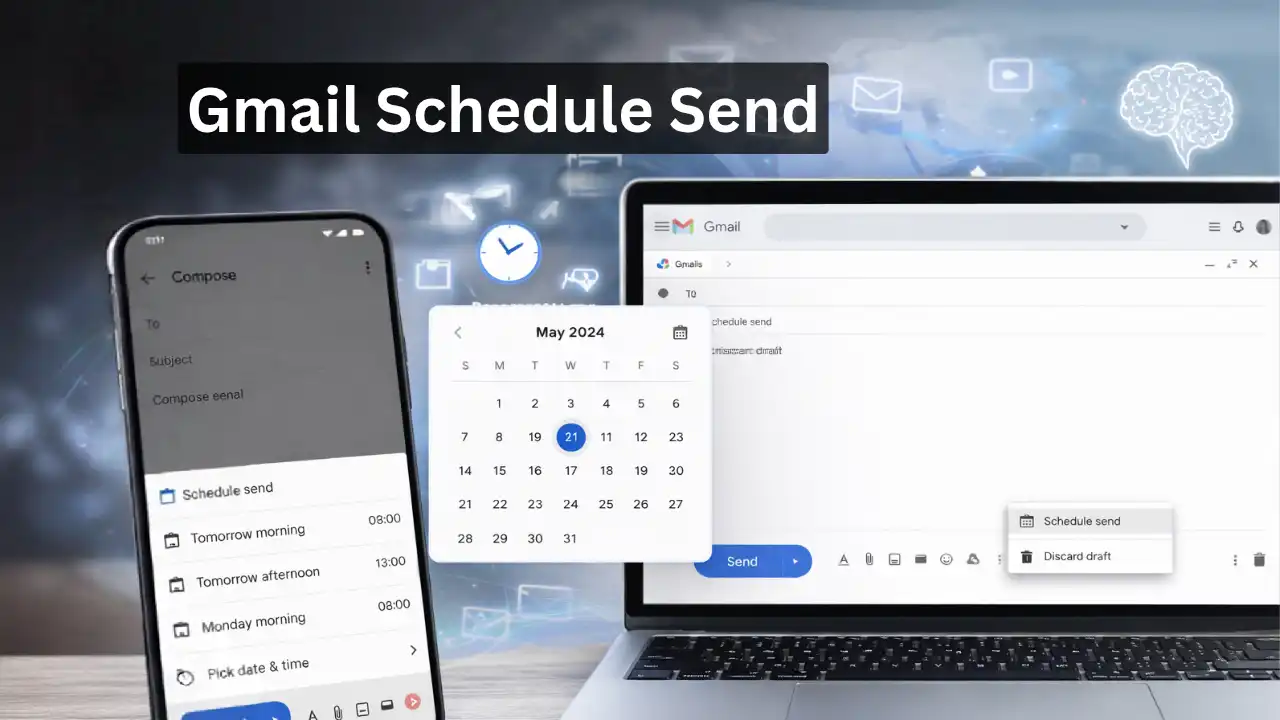
Open the Gmail app on Android or iOS and tap on Compose. After writing the email, go to the three dots present on the top right and choose the Schedule send option.
Here you get preset options like Tomorrow morning. If you want, you can also set the date and time according to your convenience. In the latest update, keeping users’ daily routines in mind, smart time suggestions have also started appearing.
How to use Schedule Send in Gmail on desktop?
Open Gmail in the browser and draft a new email. After this, click on the arrow given next to the Send button and select Schedule send. Here the time zone is automatically detected, so you can send emails to people in different countries at the right time.
Comes with AI and multi-timezone support
In recent updates, Gmail’s Schedule Send feature has been connected with a smart system. This system suggests a better time to send by considering the email content and the receiver’s location. Especially for people working with global teams and international clients, this feature is being considered quite useful.
Who is it most beneficial for?
For office professionals, freelancers, students, and startups, Schedule Send has become a reliable tool. In India, people associated with the IT sector are using it for reports and follow-ups, while abroad it is being widely used for business communication.